How to Root Lava XOLO A700 is what you searching? if yes then you are at right place. We will root Lava XOLO A700 by Bin4ry Tool. Bin4ry is a great tool for rooting almost all android devices and we will root it by this only.
Lava XOLO A700 is a brilliant device. It is very fast, stable device and users are giving very nice responses of this Lava XOLO A700. Lava XOLO A700 comes with Yes, 1GHz Dual-core MediaTek MT6577 Processor which makes your Gaming, multitasking experience awesome. MediaTek is awesome chipset which makes device faster than other chipset. There, the camera has got multiple many features which are not in common devices Rear camera: 5.0 MP Camera (2592x1944 Pixels) with HDR, Auto Focus and LED Flash, Front : 0.3 MP, VGA Camera (640x480 Pixels), Self Timer, Touch Focus, High Dynamic Range. The Screen size and display is very nice: 4.5 inches, IPS LCD Capacitive Touchscreen, 16M Colors and the video playback is very impressive, i.e. 720p@30fps. The operating system i.e. Android, obviously huh is Ice Cream Sandwitch (4.0) which can be further upgraded to JellyBean (4.1). The GPS is but obvious in most android so this is also supporting GPS, with A-GPS support with Google Maps. Yep, it supports 3G with HSDPA, 7.2 Mbps; HSUPA, 5.76 Mbps speed. Lava XOLO A700 comes with vast number of sensors like Accelerometer, Proximity and Ambient Light Sensor. The RAM is not quite impressive as comparative to other high end devices, the RAM is just 512 MB which is common in almost all devices but much better than 256 MB RAM so gamers, don't be dam harsh gamers. Oh! Forgot the main topic! Lets see rooting Lava XOLO A700.

Responsibility
Geekyzz is ~not~ responsible for your bricked Lava XOLO A700. Rooting voids your warranty, be careful while rooting your android device, if you did anything wrong and bricked Lava XOLO A700 its your responsibility but i will help you to unbrick your Lava XOLO A700, but please be careful while rooting.
Fixing Google Play Store application can't download error
What you need
1 Bin4ry Rooting Toolkit, Bin4ry Rooting Toolkit XDA thread(on first post)
2 Lava XOLO A700 (No download link :P)
3 Download .Android (its on .rar).
Extract android.rar in C:>Users>YourUserName and Reboot your computer.
Rooting Lava XOLO A700-
How to Root Lava XOLO A700-
1 Enable USB debugging in android by going, settings>Developer options>USB debugging, enable USB
debugging check box.
2 Download, unpack Bin4ry Rooting Toolkit into 1 folder
3 Double Click (Run): RunMe.bat
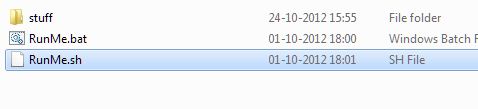
(Note: Open RunMe.bat not RunMe.sh)
4 Press "1" when launched (Normal Mode)
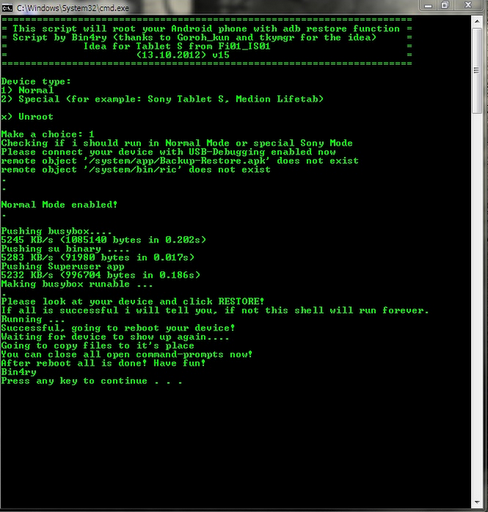
5 It will root automatically and will display as above.
6 When done, press any key
7 When Rooted, then shout 'Yippy, Rooted My Lava XOLO A700'
Wait..... See this awesome list of Tweaks/Mods for Lava XOLO A700 here- Click ME
Lava XOLO A700 is a brilliant device. It is very fast, stable device and users are giving very nice responses of this Lava XOLO A700. Lava XOLO A700 comes with Yes, 1GHz Dual-core MediaTek MT6577 Processor which makes your Gaming, multitasking experience awesome. MediaTek is awesome chipset which makes device faster than other chipset. There, the camera has got multiple many features which are not in common devices Rear camera: 5.0 MP Camera (2592x1944 Pixels) with HDR, Auto Focus and LED Flash, Front : 0.3 MP, VGA Camera (640x480 Pixels), Self Timer, Touch Focus, High Dynamic Range. The Screen size and display is very nice: 4.5 inches, IPS LCD Capacitive Touchscreen, 16M Colors and the video playback is very impressive, i.e. 720p@30fps. The operating system i.e. Android, obviously huh is Ice Cream Sandwitch (4.0) which can be further upgraded to JellyBean (4.1). The GPS is but obvious in most android so this is also supporting GPS, with A-GPS support with Google Maps. Yep, it supports 3G with HSDPA, 7.2 Mbps; HSUPA, 5.76 Mbps speed. Lava XOLO A700 comes with vast number of sensors like Accelerometer, Proximity and Ambient Light Sensor. The RAM is not quite impressive as comparative to other high end devices, the RAM is just 512 MB which is common in almost all devices but much better than 256 MB RAM so gamers, don't be dam harsh gamers. Oh! Forgot the main topic! Lets see rooting Lava XOLO A700.
Responsibility
Geekyzz is ~not~ responsible for your bricked Lava XOLO A700. Rooting voids your warranty, be careful while rooting your android device, if you did anything wrong and bricked Lava XOLO A700 its your responsibility but i will help you to unbrick your Lava XOLO A700, but please be careful while rooting.
Must Read:
Removing Lag from HD games androidFixing Google Play Store application can't download error
What you need
1 Bin4ry Rooting Toolkit, Bin4ry Rooting Toolkit XDA thread(on first post)
2 Lava XOLO A700 (No download link :P)
3 Download .Android (its on .rar).
Extract android.rar in C:>Users>YourUserName and Reboot your computer.
Rooting Lava XOLO A700-
How to Root Lava XOLO A700-
1 Enable USB debugging in android by going, settings>Developer options>USB debugging, enable USB
debugging check box.
2 Download, unpack Bin4ry Rooting Toolkit into 1 folder
3 Double Click (Run): RunMe.bat
(Note: Open RunMe.bat not RunMe.sh)
4 Press "1" when launched (Normal Mode)
5 It will root automatically and will display as above.
6 When done, press any key
7 When Rooted, then shout 'Yippy, Rooted My Lava XOLO A700'
Wait..... See this awesome list of Tweaks/Mods for Lava XOLO A700 here- Click ME


