How to root micromax a54 Smarty 3.5 is what you searching? if yes then you are at right place. Some people say it is Micromax A54 Ninja 3.5 and some smarty 3.5 so let it be smarty in my site for discussion.
Micromax A54 Smarty 3.5 is very nice android device with low cost and with many features. Micromax A54 smarty 3.5's CPU clock is 1 Ghz which is okay for almost every users, if you play more games it is less for you then but still the CPU is okay but it almost every android come with 1 Ghz so it should be 1.2 Ghz something clock. The RAM, ah..to less the ram is just 256 MB which is not awesome for even non-gamer people, in 256 MB of RAM you can't even run temple run and other HD games in your android device if you have not rooted. The camera is quite nice, the 3MP camera clicks very nice pictures and better than those 1.3/2MP Cameras so camera is one advantage of micromax a54 Smarty 3.5. The screen size is also nice, 3.15 Inches but this is also in almost every smart phone but it is not a disadvantage. The 4X Zoom is available in camera so no need to go near towards the object. The overall, this device is not that much good as comparative to other micromax devices but the price is less so it is worth of buying. We will root micromax a54 smarty 3.5 with bin4ry tool, it is light weighted and very nice tool to root devices which are not MTK (you can root MTK too after making boot.img unsecure). Ah..lets see Rooting Micromax A54 Smarty 3.5.

Geekyzz is ~not~ responsible for your bricked Lava XOLO A500. Rooting voids your warranty, be careful while rooting your android device, if you did anything wrong and bricked Lava XOLO A500 its your responsibility but i will help you to unbrick your Lava XOLO A500, but please be careful while rooting.
What you need
1 Bin4ry Rooting Toolkit, Bin4ry Rooting Toolkit XDA thread(on first post)
2 Micromax A54 Smarty (No download link :P)
3 Download .Android (its on .rar).
Extract android.rar in C:>Users>YourUserName and Reboot your computer.
Rooting Micromax A54 Smarty-
How to Root Micromax A54 Smarty-
1 Enable USB debugging in android by going, settings>Developer options>USB debugging, enable USB
debugging check box.
2 Download, unpack Bin4ry Rooting Toolkit into 1 folder
3 Double Click (Run): RunMe.bat
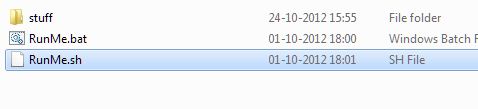
(Note: Open RunMe.bat not RunMe.sh)
4 Press "1" when launched (Normal Mode)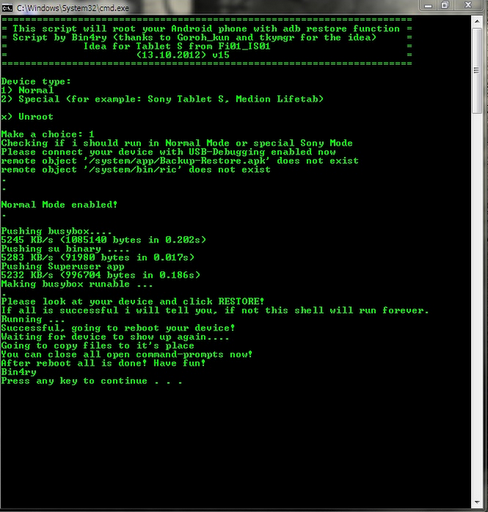
5 It will root automatically and will display as above.
6 When done, press any key
7 When Rooted, then shout 'Yippy, Rooted My Micromax A54 Smarty'
Micromax A54 Smarty 3.5 is very nice android device with low cost and with many features. Micromax A54 smarty 3.5's CPU clock is 1 Ghz which is okay for almost every users, if you play more games it is less for you then but still the CPU is okay but it almost every android come with 1 Ghz so it should be 1.2 Ghz something clock. The RAM, ah..to less the ram is just 256 MB which is not awesome for even non-gamer people, in 256 MB of RAM you can't even run temple run and other HD games in your android device if you have not rooted. The camera is quite nice, the 3MP camera clicks very nice pictures and better than those 1.3/2MP Cameras so camera is one advantage of micromax a54 Smarty 3.5. The screen size is also nice, 3.15 Inches but this is also in almost every smart phone but it is not a disadvantage. The 4X Zoom is available in camera so no need to go near towards the object. The overall, this device is not that much good as comparative to other micromax devices but the price is less so it is worth of buying. We will root micromax a54 smarty 3.5 with bin4ry tool, it is light weighted and very nice tool to root devices which are not MTK (you can root MTK too after making boot.img unsecure). Ah..lets see Rooting Micromax A54 Smarty 3.5.

Responsibility
Geekyzz is ~not~ responsible for your bricked Lava XOLO A500. Rooting voids your warranty, be careful while rooting your android device, if you did anything wrong and bricked Lava XOLO A500 its your responsibility but i will help you to unbrick your Lava XOLO A500, but please be careful while rooting.
Must Read:
Removing Lag from HD games androidWhat you need
1 Bin4ry Rooting Toolkit, Bin4ry Rooting Toolkit XDA thread(on first post)
2 Micromax A54 Smarty (No download link :P)
3 Download .Android (its on .rar).
Extract android.rar in C:>Users>YourUserName and Reboot your computer.
Rooting Micromax A54 Smarty-
How to Root Micromax A54 Smarty-
1 Enable USB debugging in android by going, settings>Developer options>USB debugging, enable USB
debugging check box.
2 Download, unpack Bin4ry Rooting Toolkit into 1 folder
3 Double Click (Run): RunMe.bat
(Note: Open RunMe.bat not RunMe.sh)
4 Press "1" when launched (Normal Mode)
5 It will root automatically and will display as above.
6 When done, press any key
7 When Rooted, then shout 'Yippy, Rooted My Micromax A54 Smarty'


