Showing posts with label Rooting Guides. Show all posts
Friday, 24 May 2013

How To Root Micromax A88 Canvas Music


How To Root Micromax A88 Canvas Music or Rooting Micromax A88 Canvas Music is the general question from the people who are searching rooting guide for Micromax A88 Canvas Music.
Micromax A88 Canvas Music is a new released android device! It has many nice features and it is special in music, which is obvious that it is loud in music. Micromax A88 Canvas Music has got 4.5 inches capacitive touchscreen, which  can boost your gaming experience. Micromax A88 Canvas Music gets with free JBL Tempo Headset .  It has got 512 MB of RAM which is good for gaming, multi-tasking, and other applications which require high RAM. It has 1 GHz Dual Core processor, means 1*2x processor which will be fast for sure. Ah! this has got a special feature that other android devices don't have! it has Android 4.1 JellyBean OS and which is better than most android phones which has Android 4.0 Ice Cream Sandwitch like Micromax A110 Canvas 2. The camera is common, yes, the camera is 5 MP which is almost in all android devices like Micromax A115 Canvas 3D so we can say its mixture of Micromax A110 Canvas 2 and Micromax A115 Canvas 3D eh. It has 3G feature for fast internet surfing and for faster youtube videos streaming. It has Dual-SIM support for your 2 SIMs which are mostly 1st for calling and 2nd for internet. Oh! we forgot our main topic! that was how to root micromax a88 Canvas Music-


Downloads: 
* Bin4ry Rooting Toolkit.
* Micromax A88 Canvas Music Original USB drivers.
(NOTE: Install it, Reboot and then follow this guide.)


How To Root Micromax A88 Canvas Music with Bin4ry Rooting toolkit-

1 Download Bin4ry Rooting Toolkit on your Desktop.

2 Extract it in a folder.

3 Now, connect your Micromax A88 Canvas Music to your computer and change the USB storage to Media Device.

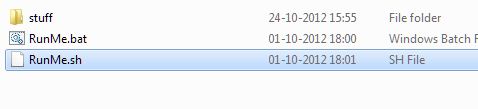
4 Open, RunMe.bat file.

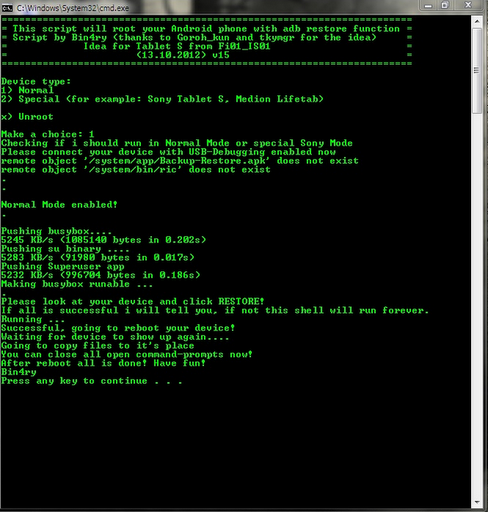
5 Now, Press 1 to Root Micromax A88 Canvas Music, now commands will show running and let Bin4ry rooting kit Root Micromax A88 Canvas Music. It usually takes 1-2 minutes maximum.

NOTE: Your device might Reboot itself. Don't worry and don't remove USB till the Bin4ry says it is done because it can lead to bricked Micromax A88 Canvas Music.


6 When, it will say have fun! then it means that your Micromax A88 Canvas Music is rooted now!

Enjoy Rooting Micromax A88 Canvas Music and don't forget to share this with your friends.

Thursday, 25 April 2013

How to Root Karbonn A27 Retina | Easy Way


How to root Karbonn A27 Retina or Rooting Karbonn A27 Retina is your search:? yes? if yes then you are at right place. I will show you that how to root karbonn a27 Retina easily.
Karbonn A27 Retina is having great 4.3 inches of qHD IPS touch screen display which feels awesome when you see the pictures popping out from it. 4.3 is made for your endless gaming and qHD for feel that you are just there! It has Android 4.1 JellyBean OS which is really well made by Google and which makes it competitor of Micromax A116 Canvas HD. It has 1.2 Ghz dual-core processor where as Micromax A116 Canvas HD has Quad-Core processor so it will be amazingly faster than Karbonn A27 Retina. 512 MB to support you to play games like temple run, gangstar, GTA, NFS etc etc and for lag-free experience. It has 8 MP camera whereas almost all android devices has 5 MP camera which is not good like this. Front camera is 1.3 MP in almost all android devices but it is having 2 MP of camera which makes skype, self-picture-capturing experience better and micromax a87 is having 2 MP as rear camera and the quality is very poor. 2.97 ( Round-of 3 GB) is the storage in which you can store anything like games, applications, songs etc and if you feel it small then you can also use SD card (expandable to 32 GB) it has 2G, 3G, GPS, GPRS/EDGE, Wi-Fi, Wi-Fi Hotspot, Bluetooth and micro USB support. So this is a great phone with awesome specifications and better for games. Oh! i forgot that you are here to see how to root Karbonn a27 retina so lets see how to root karbonn a27 retina-


Must Read:

Removing Lag from HD games android
Fixing Google Play Store application can't download error

Using Chainfire 3d to improve gaming experience | Remove lags from HD games


Responsibility 

Geekyzz is ~not~ responsible for your bricked Karbonn A27 retina. Rooting voids your warranty, be careful while rooting your android device, if you did anything wrong and bricked Karbonn A27 retina its your responsibility but i will help you to unbrick your Karbonn A27 retina, but please be careful while rooting.


Downloads

1 Bin4ry Rooting Toolkit,            Bin4ry Rooting Toolkit XDA thread(on first post)

2 Karbonn A27 retina  (No download link for Karbonn A27 retina:P)

3  Download .Android (its on .rar).
 Extract android.rar in C:>Users>YourUserName and Reboot your computer. 


Rooting  Karbonn A27 retina -


How to Root  Karbonn A27 retina -

**Before Rooting Karbonn A277 retina, Disable USB debugging in android device if you enabled it (by going, settings>Developer options>USB debugging, disable USB debugging check box.) and now connect USB (don't mount SD card) and you will see drivers, now install em! if you do not see then enable USB debugging and then try this! if still you do not get drivers, continue this guide!** OR eh! if you feel this guide tough then use this easy thing- Installing Drivers of Any Android Device by Pdanet


1 Enable USB debugging on Karbonn A27 retina by going, settings>Developer options>USB debugging, enable USB debugging check box.

2 Download, unpack Bin4ry Rooting Toolkit into 1 folder

3 Double Click (Run): RunMe.bat
 
(Note: Open RunMe.bat not RunMe.sh)


4 Press "1" when launched (Normal Mode)

5 It will root automatically and will display as above.

6 When done, press any key

7 When Rooted, then shout 'Yippee, Rooted My Karbonn A27 retina ' 


NOW INSTALL ANY CUSTOM RECOVERY OR CUSTOM ROM ON YOUR KARBONN A27 retina.
Tuesday, 12 March 2013

How to Root Sony Xperia Tipo St21i and install CWM


"How to Root Sony Xperia Tipo or/and install clockworkmod recovery in it", is what you searching? if yes then you are at right place. I have made two parts in 1 post, 1 is how to root sony xperia tipo and 2nd how to install clockworkmod recovery in sony xperia tipo.
Rooting helps devices to flash custom firmwares (custom roms) and custom kernel which results in making that android device fast. Sony Xperia Tipo has got many custom roms but without rooting, you cannot flash
(install) mods, custom roms, custom kernels etc. I am showing you how to root sony xperia tipo with bin4ry rooting toolkit. Bin4ry toolkit is light waited and can root many android devices (MTK devices cannot be rooted by bin4ry). So lets see how to root Sony Xperia Tipo ST21i.


What you need
1 Bin4ry Rooting Toolkit,            Bin4ry Rooting Toolkit XDA thread(on first post)

2 Sony Xperia Tipo (No download link :P)

3  Download .Android (its on .rar).
 Extract android.rar in C:>Users>YourUserName and Reboot your computer.
Rooting Sony Xperia Tipo St2li-

How to Root Sony Xperia Tipo ST21i-


1 Enable USB debugging in android by going, settings>Developer options>USB debugging, enable USB 
debugging check box.

2 Download, unpack Bin4ry Rooting Toolkit into 1 folder

3 Double Click (Run): RunMe.bat
 
(Note: Open RunMe.bat not RunMe.sh)


4 Press "1" when launched (Normal Mode)

5 It will root automatically and will display as above.

6 When done, press any key

7 When Rooted, then shout 'Yippy, Rooted My Sony Xperia Tipo St21i'


How to install clockworkmod recovery in Sony Xperia Tipo St21i-

Requirements-
1 Make sure you have rooted Sony Xperia Tipo st21i with above guide.

2 CLOCKWORKMOD recovery- CLICK ME! (link is on 1st post, attachment).

How to install clockworkmod recovery-
1 Download CLOCKWORKMOD recovery.

2 Unzip it in desktop or at any place (using 7zip, winzip etc).

3 Make sure you have enabled USB debugging, if you have not enable USB debugging do this-
 going, settings>Developer options>USB debugging, enable USB 
debugging check box.

4 Connect USB to PC or Laptop.

5 Open (Run) "Install.bat" file and it will install clockworkmod recovery itself in your Sony Xperia Tipo St21i.

6 Once it is done, Reboot.

7 You have installed (flashed) Clockworkmod recovery in your tipo!

Tip: Now you can install many custom roms and custom kernels. Open google.com and search for "Sony Xperia Tipo Xda" and you will see XDA thread, open and explore roms.

Time to install Custom Rom (cyanogenmod 10)-


Now you can install (JellyBean) CyanogenMod 4.1 Custom Rom (most popular rom over XDA):
CLICK ME!