How to root Lava XOLO A500 or Rooting Lava XOLO A500 is what you searching? if yes then you are at right place. I am gonna show you how to root Lava XOLO A500 easily today. Lava XOLO A500 has got 4 Inches of WVGA Screen which makes your Video, Gaming and other visual thing's experience very nice and great.The RAM aha, common in almost every device but still awesome and cool, 512 MB RAM and powered with CPU : 1 GHz Qualcomm Krait, Dual Core processor makes your multitasking, gaming, application experience damn cool and blazing fast. In this Lava XOLO A500 the gaming experience is also very awesome and edge cutting 3d Games because it is powered with the fast, blazing GPU : Adreno 203 which is awesome. The camera is also nice of Lava XOLO A500 (uh not like Sony Xperia Z but still very cool) because it is powered with Rear : 5.0 MP Camera, 2592x1944 Pixels with Flash and Front camera is 0.3 MP, VGA Camera 640x480 Pixels and camera has many features like Quality and Vibrant Photographs in Low Light Environment, Face Detection, Screenshot Capturing. And the video play back is awesome! means it supports Video Formats like MP4, 3GPP, HD Video Playback. The music playback is also quite nice because it supports 3D sound. Oh! Android version! ah android version is Ice Cream Sandwitch (Android:4.0) but it was better if it was Android OS JellyBean (Android 4.1.x or 4.2.x). There are sensors like other android also have but not special sensors so what you think about sensors? ah they are Ambient Light Sensor, Proximity Sensor, better than android android becuase some do not have even Ambient Light Sensors. Don't Ask about touch type, it is obviously capacitive. Ah, Lets See How to Root Lava XOLO A500 Easy Way-

Responsibility
Geekyzz is ~not~ responsible for your bricked Lava XOLO A500. Rooting voids your warranty, be careful while rooting your android device, if you did anything wrong and bricked Lava XOLO A500 its your responsibility but i will help you to unbrick your Lava XOLO A500, but please be careful while rooting.
Removing Lag from HD games android
Fixing Google Play Store application can't download error
What you need to root Lava XOLO A500
1 Bin4ry Rooting Toolkit, Bin4ry Rooting Toolkit XDA thread(on first post)
2 Lava XOLO A500 (No download link for Lava XOLO A500 :P)
3 Download .Android (its on .rar).
Extract android.rar in C:>Users>YourUserName and Reboot your computer.
Rooting Lava XOLO A500-
How to Root Lava XOLO A500-
1 Enable USB debugging on Lava XOLO A500 by going, settings>Developer options>USB debugging, enable USB debugging check box.
2 Download, unpack Bin4ry Rooting Toolkit into 1 folder
3 Double Click (Run): RunMe.bat
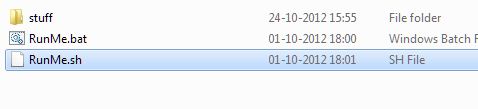
(Note: Open RunMe.bat not RunMe.sh)
4 Press "1" when launched (Normal Mode)
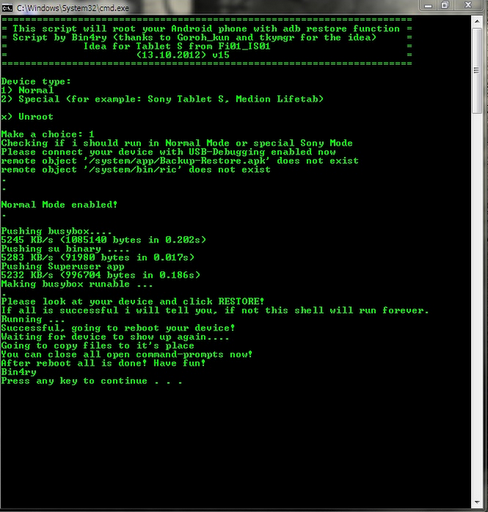
5 It will root automatically and will display as above.
6 When done, press any key
7 When Rooted, then shout 'Yippee, Rooted My Lava XOLO A500'
Install CWM In Lava XOLO A500- click me
Responsibility
Geekyzz is ~not~ responsible for your bricked Lava XOLO A500. Rooting voids your warranty, be careful while rooting your android device, if you did anything wrong and bricked Lava XOLO A500 its your responsibility but i will help you to unbrick your Lava XOLO A500, but please be careful while rooting.
Must Read:
Fixing Google Play Store application can't download error
What you need to root Lava XOLO A500
1 Bin4ry Rooting Toolkit, Bin4ry Rooting Toolkit XDA thread(on first post)
2 Lava XOLO A500 (No download link for Lava XOLO A500 :P)
3 Download .Android (its on .rar).
Extract android.rar in C:>Users>YourUserName and Reboot your computer.
Rooting Lava XOLO A500-
How to Root Lava XOLO A500-
1 Enable USB debugging on Lava XOLO A500 by going, settings>Developer options>USB debugging, enable USB debugging check box.
2 Download, unpack Bin4ry Rooting Toolkit into 1 folder
3 Double Click (Run): RunMe.bat
(Note: Open RunMe.bat not RunMe.sh)
4 Press "1" when launched (Normal Mode)
5 It will root automatically and will display as above.
6 When done, press any key
7 When Rooted, then shout 'Yippee, Rooted My Lava XOLO A500'
Install CWM In Lava XOLO A500- click me


