How To Root Lava XOLO A800, Rooting Lava XOLO A800, Root Lava XOLO A800, Rooting it! the main answer i will be solving for all of you. If you are ready then, fasten your seat belt. And Go!
Lava XOLO A800 is a nice phone with nice features. 5.0 inch capacitive touchscreen which is really cool for playing games, viewing movies, videos and capacitive means smooth touch!! you can say it FEATHER touch. Lava XOLO A800 has Dual Sim feature for people (like me eh!) who have two sim. 1 for Internet and 1 for Calling etc etc. It has Android 4.0 Ice Cream Sandwitch but it would be superb if it would be 4.1/4.2 JellyBean. The camera is amazing, yep! most android devices have 5 MegaPixels of camera like Micromax A101, Karbonn A6 etc etc. 8 MP camera clicks really nice pictures but what about Front Camera? it is very poor!! really! it is 0.3 VGA camera which is poor. 1 GHz Dual-Core processor for your endless gaming, multitasking etc etc. Dual Core means Two processors and you can think the power now. 512 RAM is powered with this device for smooth gaming, multitasking and for overall fast experience. 1600 mAH battery is provided in this Lava XOLO A800. Obviously, it has Wi-Fi and 3g for fast internet and all. It has GPS, 3g, Wi-Fi, Bluetooth etc etc. Oh!! We forgot our main topic! that was of Rooting Lava XOLO A800. Okay, lets see how can we root lava xolo a800 easily-
Removing Lag from HD games android
Fixing Google Play Store application can't download error
What you need
1 Bin4ry Rooting Toolkit
2 Lava XOLO A800 (No download link :P)
3 Download .Android (its on .rar).
Extract android.rar in C:>Users>YourUserName and Reboot your computer.
Rooting Lava XOLO A800-
How to Root Lava XOLO A800-
1 Enable USB debugging in android by going, settings>Developer options>USB debugging, enable USB
debugging check box.
2 Download, unpack Bin4ry Rooting Toolkit into 1 folder
3 Double Click (Run): RunMe.bat
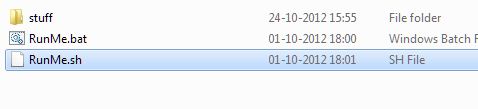
(Note: Open RunMe.bat not RunMe.sh)
4 Press "1" when launched (Normal Mode)
5 It will root automatically and will display as above.
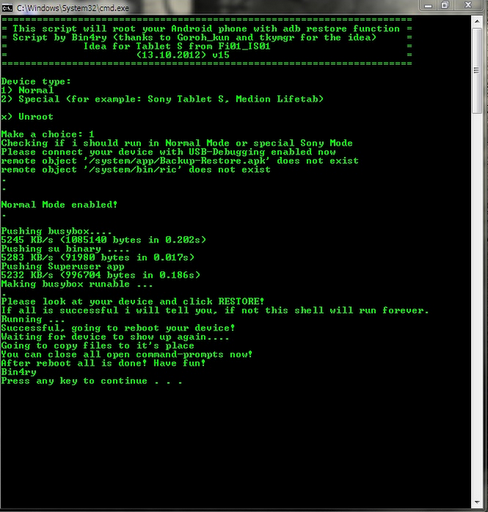
6 When done, press any key
7 When Rooted, then shout 'Yippy, Rooted My Lava XOLO A800'
Now, you can flash any custom ROM or Custom Recovery in Lava XOLO A800 which is available.
Lava XOLO A800 is a nice phone with nice features. 5.0 inch capacitive touchscreen which is really cool for playing games, viewing movies, videos and capacitive means smooth touch!! you can say it FEATHER touch. Lava XOLO A800 has Dual Sim feature for people (like me eh!) who have two sim. 1 for Internet and 1 for Calling etc etc. It has Android 4.0 Ice Cream Sandwitch but it would be superb if it would be 4.1/4.2 JellyBean. The camera is amazing, yep! most android devices have 5 MegaPixels of camera like Micromax A101, Karbonn A6 etc etc. 8 MP camera clicks really nice pictures but what about Front Camera? it is very poor!! really! it is 0.3 VGA camera which is poor. 1 GHz Dual-Core processor for your endless gaming, multitasking etc etc. Dual Core means Two processors and you can think the power now. 512 RAM is powered with this device for smooth gaming, multitasking and for overall fast experience. 1600 mAH battery is provided in this Lava XOLO A800. Obviously, it has Wi-Fi and 3g for fast internet and all. It has GPS, 3g, Wi-Fi, Bluetooth etc etc. Oh!! We forgot our main topic! that was of Rooting Lava XOLO A800. Okay, lets see how can we root lava xolo a800 easily-
Responsibility
Geekyzz is ~not~ responsible for your bricked Lava XOLO A800. Rooting voids your warranty, be careful while rooting your android device, if you did anything wrong and bricked Lava XOLO A800 its your responsibility but i will help you to unbrick your Lava XOLO A800, but please be careful while rooting.
Geekyzz is ~not~ responsible for your bricked Lava XOLO A800. Rooting voids your warranty, be careful while rooting your android device, if you did anything wrong and bricked Lava XOLO A800 its your responsibility but i will help you to unbrick your Lava XOLO A800, but please be careful while rooting.
Must Read:
Fixing Google Play Store application can't download error
What you need
1 Bin4ry Rooting Toolkit
2 Lava XOLO A800 (No download link :P)
3 Download .Android (its on .rar).
Extract android.rar in C:>Users>YourUserName and Reboot your computer.
Rooting Lava XOLO A800-
How to Root Lava XOLO A800-
1 Enable USB debugging in android by going, settings>Developer options>USB debugging, enable USB
debugging check box.
2 Download, unpack Bin4ry Rooting Toolkit into 1 folder
3 Double Click (Run): RunMe.bat
(Note: Open RunMe.bat not RunMe.sh)
4 Press "1" when launched (Normal Mode)
5 It will root automatically and will display as above.
6 When done, press any key
7 When Rooted, then shout 'Yippy, Rooted My Lava XOLO A800'
Now, you can flash any custom ROM or Custom Recovery in Lava XOLO A800 which is available.


